Changing, Size and Position of the Chat Text and box.
This can be modified by finding the "HudChat" section in the basechat.res file in the resource\ui Folder. The settings below are from my dods version 8 HUD but sould be OK for all mods...
}
"HudChat"
{
"ControlName" "EditablePanel"
"fieldName" "HudChat"
"visible" "1" ....................// ( "1" = visable "0" = not visable)
"enabled" "1" .....................// ( "1" = enabled "0" = not enabled)
"xpos" "2" .....................// (The width position from top left corner of the box)
"ypos" "315" .................// (The height position from top left corner of the box)
"wide" "250" ................// (How wide the chat box is)
"tall" "100" ................// (How high the chat box is)
"PaintBackgroundType" "2" ...// (default "2" this makes rounded corners on the panel.)
}
Once you have changed that section you may like to adjust the sections below it. See below for the changes (in white) I made for the rest.
Be careful with the "ChatFiltersButton" section and "HudChatHistory" section settings, too much adjustment and they will go out of the allowed area.
}
"ChatInputLine"
{
"ControlName" "EditablePanel"
"fieldName" "ChatInputLine"
"visible" "1"
"enabled" "1"
"xpos" "34"
"ypos" "447"
"wide" "213"
"tall" "2"
"PaintBackgroundType" "0"
}
"ChatFiltersButton"
{
"ControlName" "Button"
"fieldName" "ChatFiltersButton"
"xpos" "2" //"247"
"ypos" "84" //"84"
"wide" "30"
"tall" "11"
"pinCorner" "2"
"visible" "1"
"enabled" "1"
"tabPosition" "0"
"labelText" "#chat_filterbutton"
"textAlignment" "center"
"dulltext" "0"
"brighttext" "0"
"Default" "0"
"PaintBackgroundType" "2"
}
"HudChatHistory"
{
"ControlName" "RichText"
"fieldName" "HudChatHistory"
"xpos" "2"
"ypos" "2" //"5"
"wide" "246"
"tall" "75"
"wrap" "1"
"autoResize" "1"
"pinCorner" "1"
"visible" "1"
"enabled" "1"
"labelText" ""
"textAlignment" "south-west"
"font" "ChatFont"
"maxchars" "-1"
}
}
Chat box Scroll-Bar
The scroll-bar is a area where you can trim it down a bit, look at "resource\chatscheme.res" , find around line 133...
"ScrollBar.Wide "17"
This is the width of the scroll-bar, Think it is too wide? Drop it down to "5" (5 is very small) and have another look, 12 is also a good size.
Notes of other things relating to the chat text
Another left over function (for dods only).
In the past, when you changed the chat text it used to change the text in the Kills, Death and Capture Notices.
This will not happen anymore but VALVe have left the "ChatFont" section in the clientscheme.res file. This now only changes the kills and deaths and some of the scoreboard now in dods.
Example of a moved chat panel.
You can radically change things if you like, here is an example in Day of Defeat:Source, moved to centre, resized in height and width, filters button moved.
Some items just don't respond in this file, like moving the input line to the top of the panel...just will not respond to the settings in section "ChatInputLine" "xpos" works but not "ypos".
You can still change most things, but just be warned some do not respond.
Below is the code from the file resource\ui\basechat.res that will produce the effect in the image above, note you also need to visit the resource\chatscheme.res and change...
ScrollBar.Wide 17 to 12 ( ScrollBar.Wide 12 )
Code:
"Resource/UI/BaseChat.res"
{
	"HudChat"
	{
		"ControlName"		"EditablePanel"
		"fieldName" 		"HudChat"
		"visible" 		"1"
		"enabled" 		"1"
		"xpos"			"265"  	[$WIN32] //"10"
		"xpos"			"42"	[$X360]
		"ypos"			"382"  //"275"
		"ypos_hidef"		"245"
		"wide"	 		"320"  //"280"
		"tall"	 		"90"  //"120"
		"PaintBackgroundType"	"2"
	}

	ChatInputLine
	{
		"ControlName"		"EditablePanel"
		"fieldName" 		ChatInputLine
		"visible" 		"1"
		"enabled" 		"1"
		"xpos"			"5"  	[$WIN32] //"10"
		"xpos"			"42"	[$X360]
		"ypos"			"395"    //"395"
		"wide"	 		"265"  //"260"
		"tall"	 		"2"
		"PaintBackgroundType"	"0"
	}

	"ChatFiltersButton"
	{
		"ControlName"		"Button"
		"fieldName"		"ChatFiltersButton"
		"xpos"			"273"  //"225"
		"ypos"			"72"    //"2"
		"wide"			"45"
		"tall"			"15"
		"autoResize"		"1"
		"pinCorner"		"0"
		"visible"		"1"
		"enabled"		"1"
		"tabPosition"		"0"
		"labelText"		"#chat_filterbutton"
		"textAlignment"		"center"
		"dulltext"		"0"
		"brighttext"		"0"
		"Default"		"0"
	}

	"HudChatHistory"
	{
		"ControlName"		"RichText"
		"fieldName"		"HudChatHistory"
		"xpos"			"5" 	[$WIN32]  //"10"
		"ypos"			"5"	    [$WIN32]  //"17"
		"xpos"			"10"	[$X360]
		"ypos"			"10"	[$X360]
		"wide"	 		"310"  //"260"
		"tall"			"5"    //"95" "75"
		"wrap"			"1"
		"autoResize"		"1"
		"pinCorner"		"1"
		"visible"		"1"
		"enabled"		"1"
		"labelText"		""
		"textAlignment"		"south-west"
		"font"			"ChatFont"
		"maxchars"		"-1"
	}
}
...paste that in the whole file then save it.


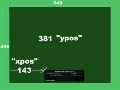
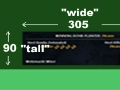


 Example of a moved chat panel.